PayPal Standard Pro (foxnetsoft.com)
PayPal Standard Pro
PayPal account, credit and debit card payments through the PayPal REST API v2, the order created only after payment (FOXNETSOFT.COM)
 Buy now
  Documentation
 Another plugins
 Performance
 Description
The plugin connects nopCommerce to the PayPal REST API v2. At the checkout the customer is redirected to PayPal and pays with the PayPal account or with a credit or debit card, and the nopCommerce order is created only after the payment is approved and the customer returns to your store.
That is the one important difference from the standard nopCommerce PayPal plugin: you see only paid orders. A customer who changes their mind on the PayPal page leaves no unpaid order behind, no stock is taken off for it, and the shopping cart is still there when they come back.
Choose Authorize to hold the money and capture it later, or Authorize And Capture to take it at once. Capture, void, full and partial refunds run through PayPal from the standard nopCommerce order page. The plugin can charge the customer in the currency selected in your store, send PayPal the whole order – products, discounts, gift cards, reward points, shipping and tax – or only its total, and add a payment fee as a fixed amount or a percentage. Recurring products are paid with PayPal subscriptions, and a webhook, created with one button on the configure page, marks the order as paid when PayPal completes a payment later. Every setting can be overridden per store, and the sandbox mode and a debug log let you test before going live. Customers who leave on the PayPal page stay as abandoned carts, which our SmartCampaigns plugin can follow up by e-mail.
How it works
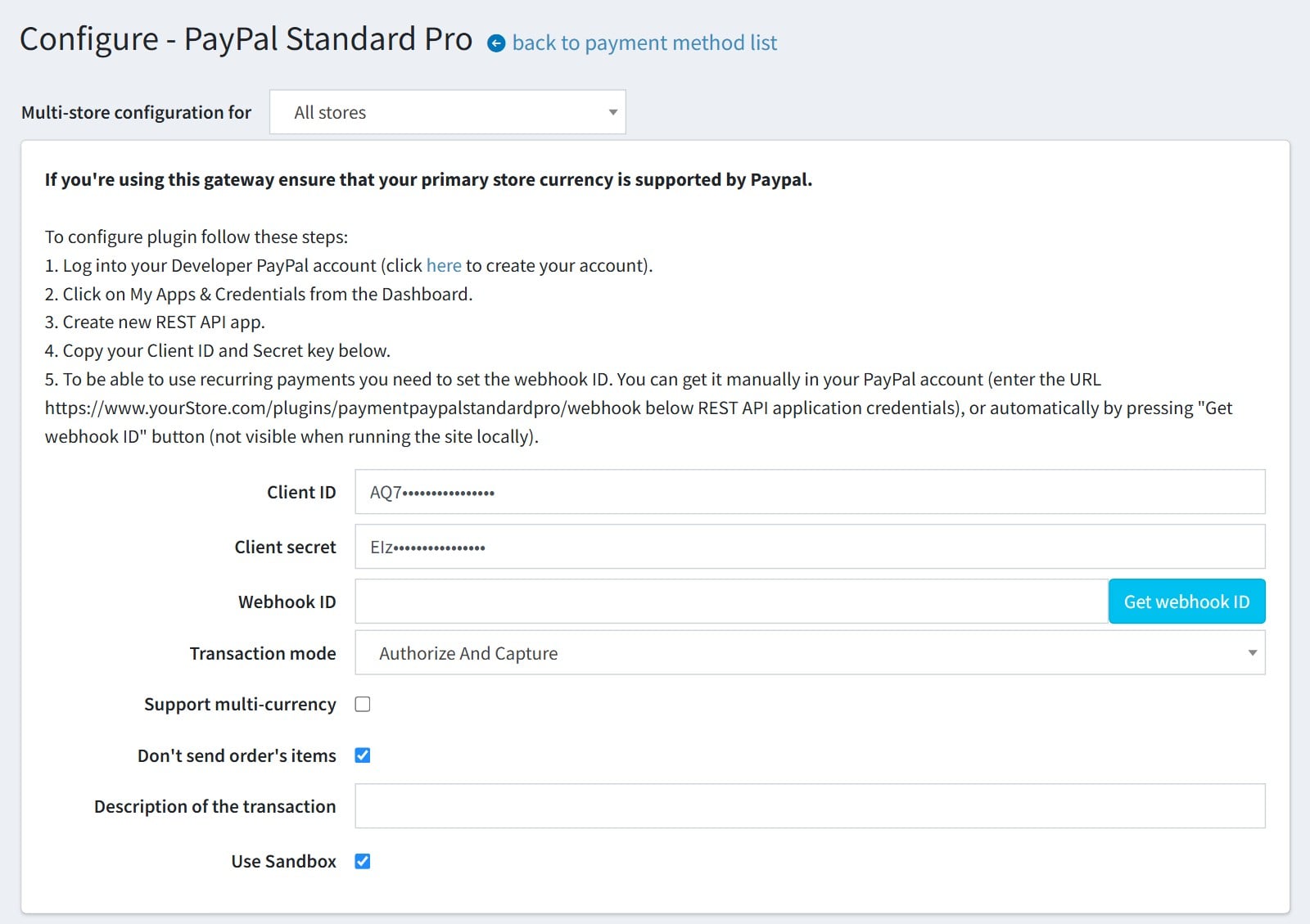
1Create a REST API app under ‘Apps & Credentials’ in your PayPal Developer account, paste its Client ID and Secret, and press ‘Get webhook ID’ – the plugin registers the webhook in your PayPal app for you. Choose ‘Authorize’ to hold the money or ‘Authorize And Capture’ to take it at once, and keep ‘Use Sandbox’ on while you test. The same page sets multi-currency charging, whether PayPal lists the order’s products or only the total, and the description the customer sees on PayPal.

2‘Create order’ is ‘After Payment’: the nopCommerce order appears only once the customer has paid on PayPal and come back to your store, so you never get unpaid orders. Add a payment fee here if you charge one, as a fixed amount or as a percentage of the order total.

3This is the checkout. PayPal Standard Pro is offered next to the other payment methods as ‘Pay by PayPal, credit or debit card’.

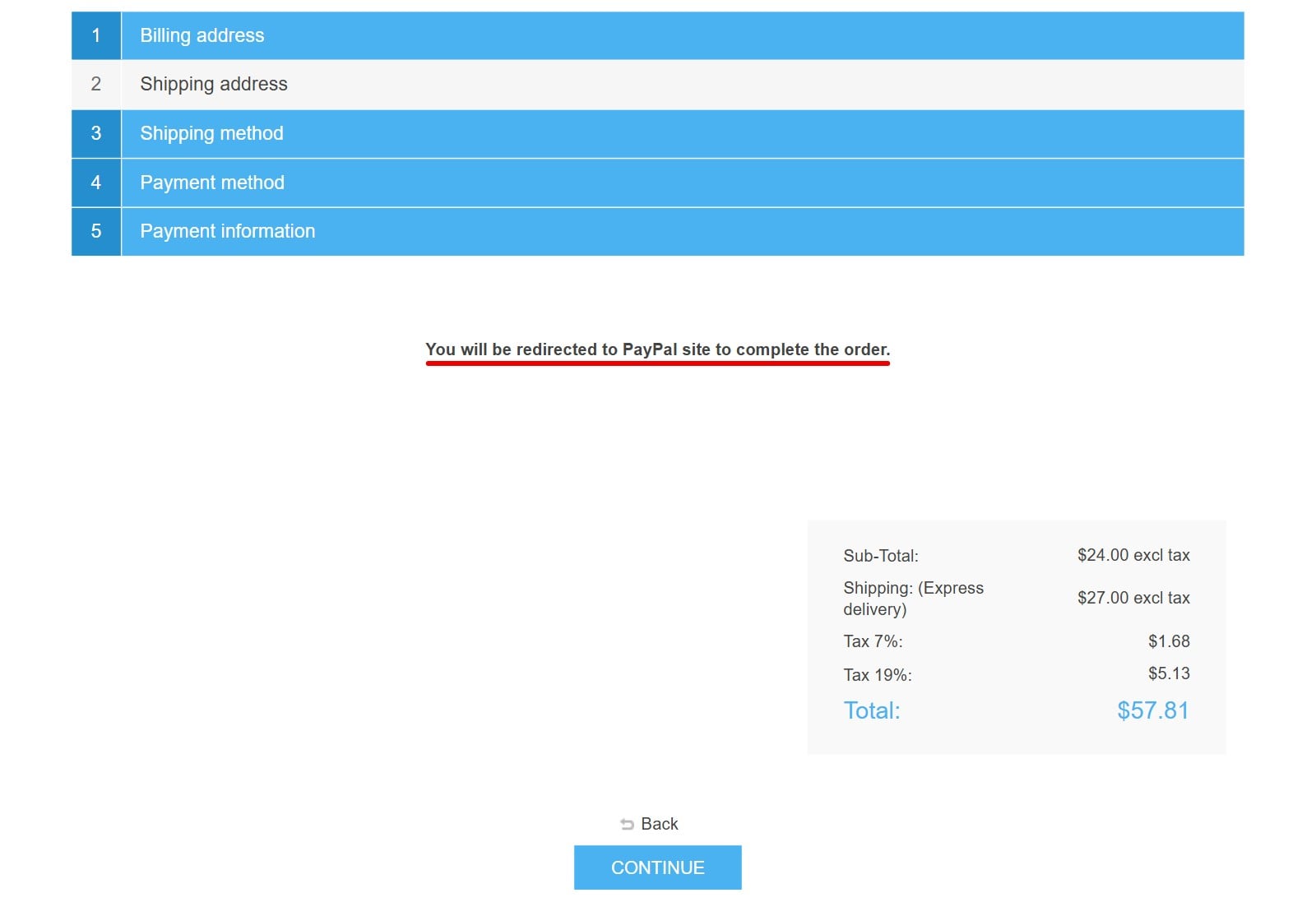
4On the ‘Payment information’ step the customer reads ‘You will be redirected to PayPal site to complete the order.’ and presses ‘Continue’. When reward points or gift cards bring the total to zero, the customer is not sent to PayPal at all.

5On PayPal the customer logs in, or pays by card without a PayPal account, and is returned to your store, where the order is created. ‘Cancel and return’ brings them back to the shopping cart with nothing lost. If the cart total changed while they were on PayPal, no order is created and the customer is told why.

6The paid order in the admin area carries the PayPal transaction ID. ‘Refund’ and ‘Partial refund’ send the money back through PayPal, and in the ‘Authorize’ mode you capture or void the payment from the same page.

7The PayPal transaction ID and the payer ID are also saved in the order notes, so every order can be traced back to its PayPal payment.

Features
- Redirect checkout on the PayPal REST API v2
- Pay with a PayPal account or a credit or debit card
- Creates nop orders only after the payment is approved
- Supports Authorize and Authorize And Capture modes
- Capture, Void, full and partial Refund from the order page
- Recurring payments through PayPal subscriptions
- Webhook created with one button on the configure page
- Supports multi-currencies and multi-stores
- Sends order items, discounts, gift cards, shipping and tax to PayPal
- Additional fee as a fixed amount or a percentage
- Checks the PayPal total against the order total
- Sandbox mode and a debug log for testing
Specification
 Supported nopCommerce 4.90, 4.80, 4.70, 4.60, 4.50, 4.40, 4.30, 4.20, 4.10
 Fully localizable using extermal XML files
 Multi-store support
 Free Trial (30 days trial period)
 1 year free support and upgrades since purchase date
 Performance optimization
 Easy setup and customization
 Fast support
About US

We did more than 190 plugins for nopcommerce. Check out portfolio.
I'm leaving this review on each of the plugins we've used because the plugins have been solid and the customer service has been extremely helpful along the way. We greatly appreciate it!
I highly recommend all of their plugins
Great product/great support!
Simona