PayPal Express Checkout (foxnetsoft.com)

PayPal Express Checkout (foxnetsoft.com)
5.0 15
Payment plugin for PayPal Express Checkout.
2027-11-19T04:10:44.5381766Z
$50.00
Scarica l'estensione Verrai reindirizzato al sito Web dello sviluppatore per scaricare questo plugin
Versioni supportate: 4.10, 4.20, 4.30, 4.40, 4.50, 4.60, 4.70, 4.80, 4.90, 5.00
Data di creazione: aprile 21,2017
Ultimo aggiornamento: novembre 02,2026
Descrizione

PayPal Express Checkout

PayPal, Venmo and Pay Later express buttons on the shopping cart page and a PayPal button on the product page (FOXNETSOFT.COM)

Description

PayPal Express Checkout is a fast PayPal checkout for nopCommerce that starts on the shopping cart page. Its three express buttons – PayPal, Venmo and Pay Later – open the PayPal window in place, where the buyer picks the address and the shipping method. The order is placed as soon as the buyer approves the payment, without the nopCommerce checkout pages.

You need a PayPal account with a REST API app: the Client ID and the Client secret. You choose which buttons to show, whether the payment is authorized or captured at once, and whether the customer pays in the primary store currency or in their own.

The plugin checks the PayPal amount against the recalculated cart before it takes any money. If the total changed after the approval, it updates the PayPal order first. Webhook messages are accepted only with a valid PayPal signature, and a PayPal payment is bound to the customer who started it. If nopCommerce can’t create the order after PayPal has taken the money, the payment is refunded automatically. For PayPal at the payment step of the checkout, use our PayPal Smart Payment Button or PayPal Standard Pro plugins.

How it works

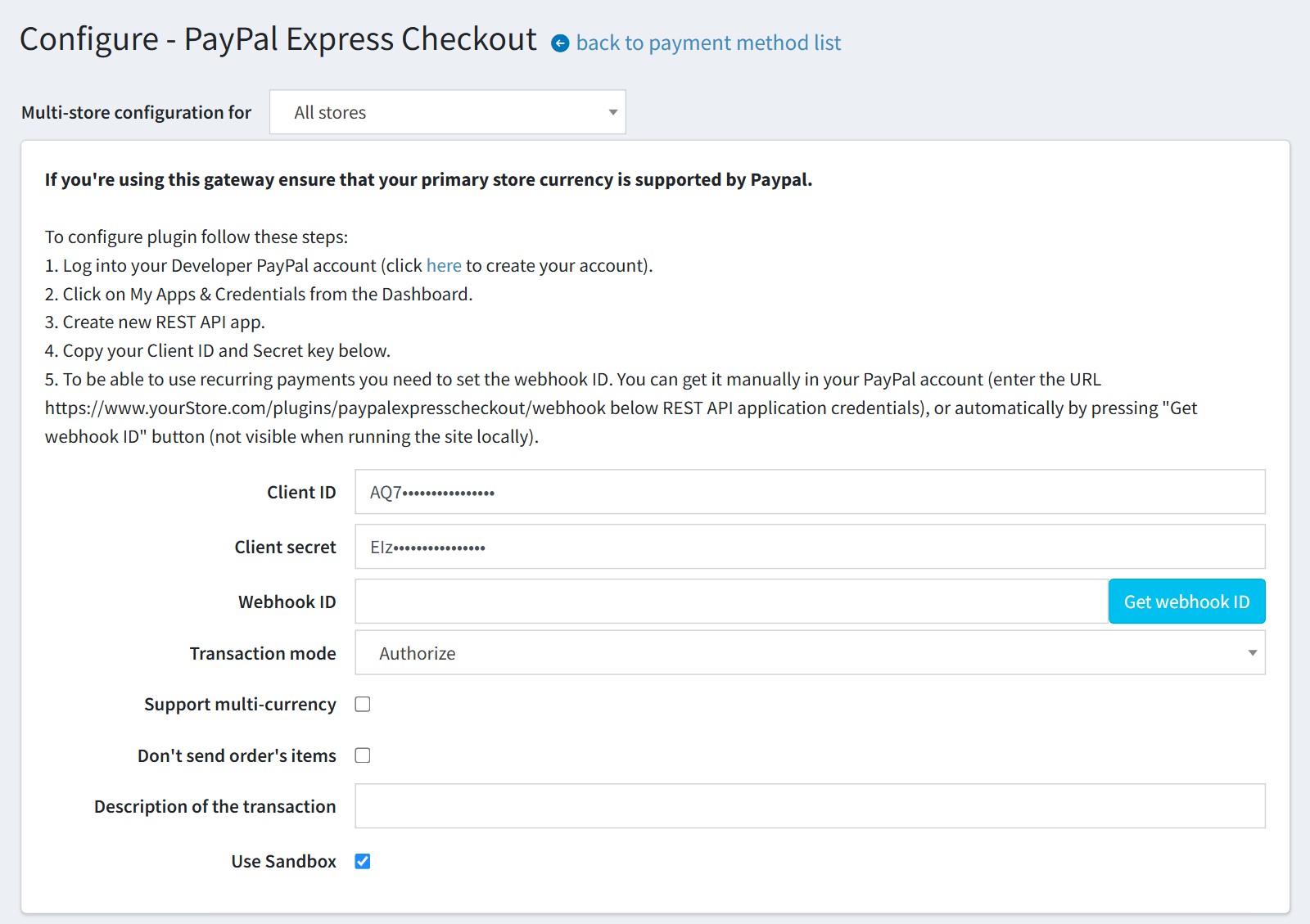
1Create a REST API app in your PayPal Developer account and copy the Client ID and the Client secret into the configure page. Press ‘Get webhook ID’ so that PayPal keeps the order status up to date. Choose Authorize, or Authorize and capture. Keep ‘Use Sandbox’ on while you test.
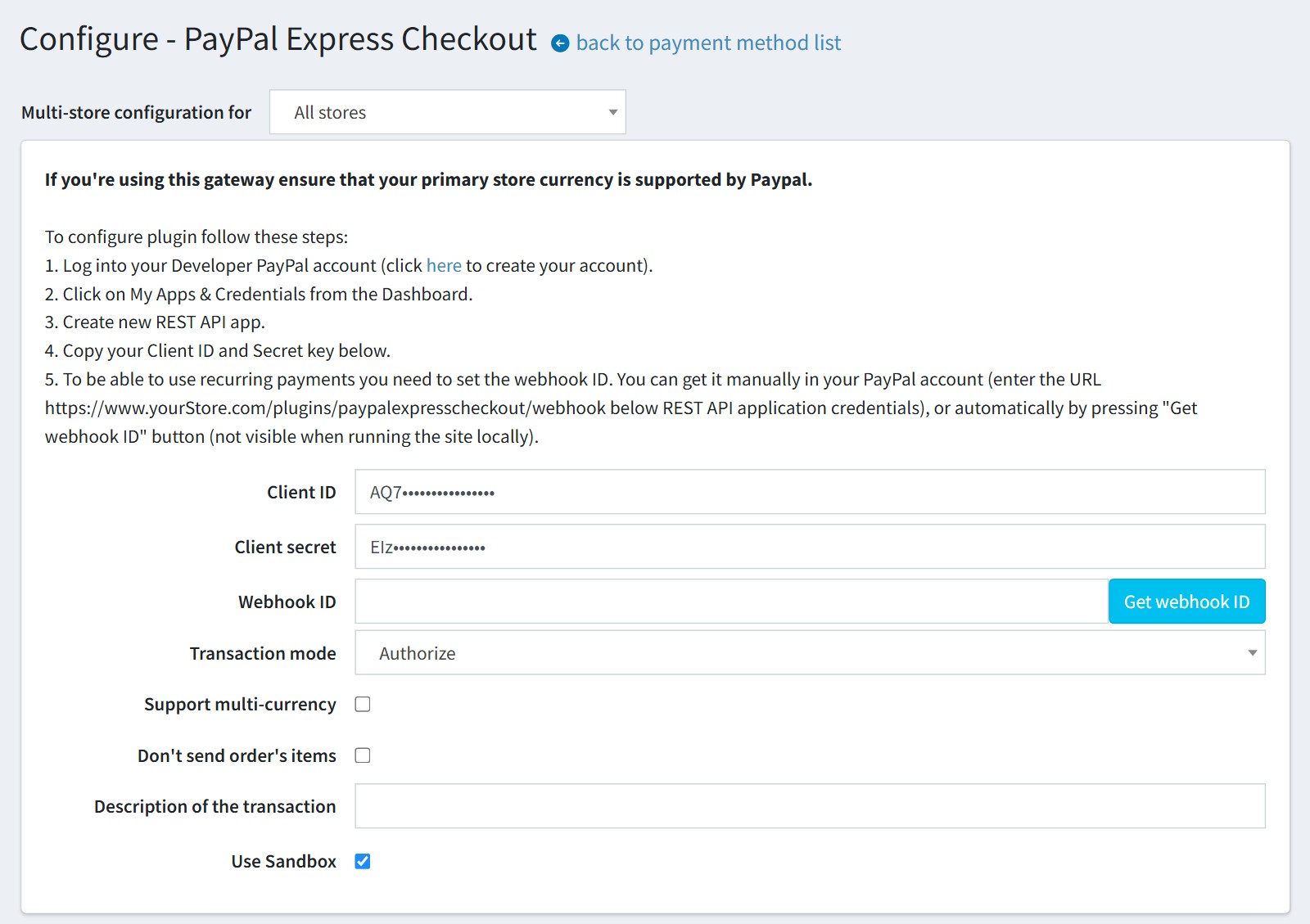
PayPal Express Checkout configure page - Client ID, Client secret, Webhook ID, Transaction mode, multi-currency and Use Sandbox

2Choose the buttons for the shopping cart page: PayPal, Venmo, Pay Later and the Pay Later message. The buttons can use the language of your store, and you set their color, shape and size. PayPal decides for each customer which of them are shown.
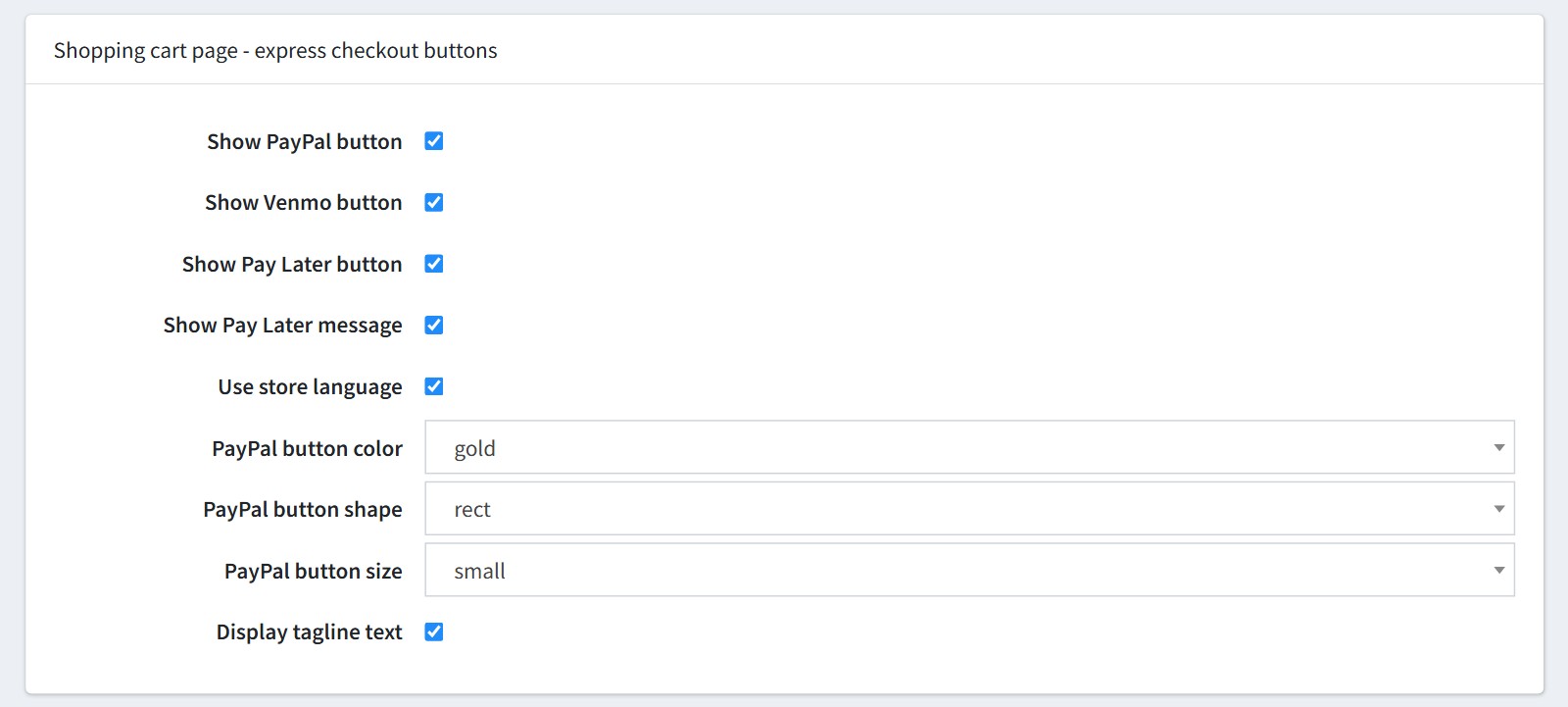
Shopping cart page settings - PayPal, Venmo and Pay Later buttons, Pay Later message, store language, button color, shape, size and tagline

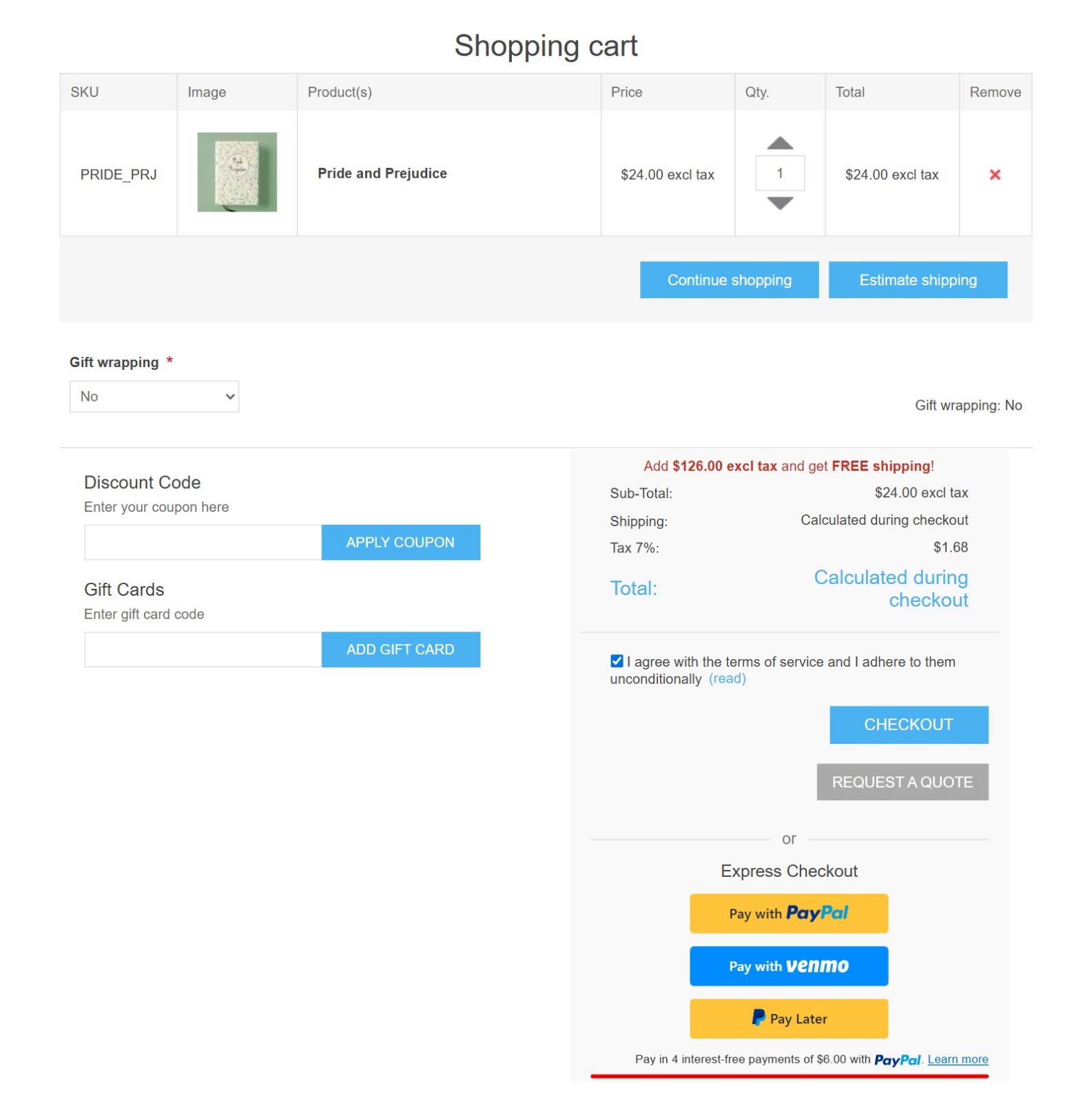
3This is the shopping cart page. The express buttons sit under the totals. If your store shows the terms of service here, they appear only after the customer ticks the checkbox.
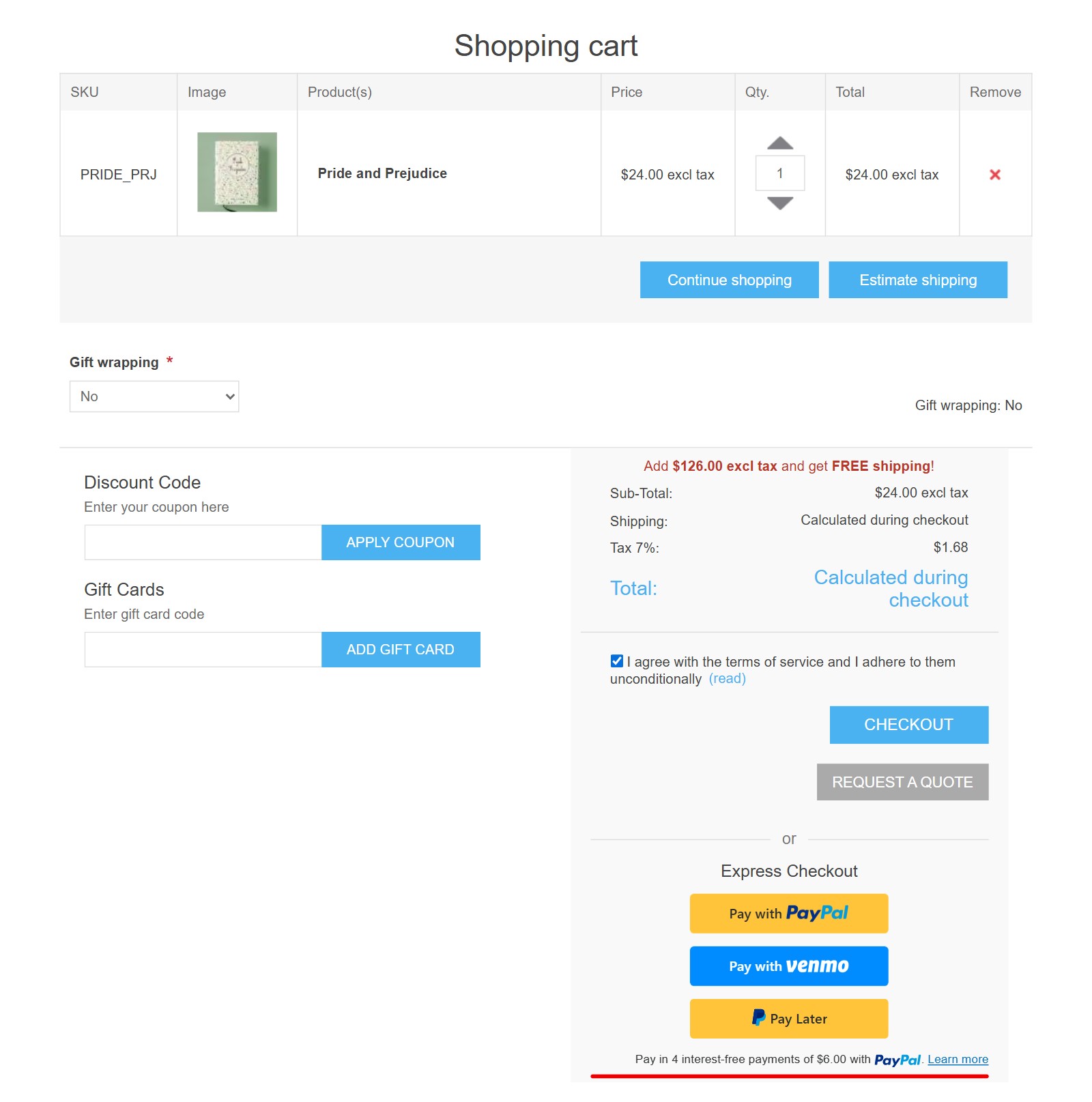
Shopping cart page with the Express Checkout buttons Pay with PayPal, Pay with Venmo and Pay Later and the Pay Later message

4With our Modern Checkout plugin the same buttons are also shown in the ‘Express checkout’ section at the top of the checkout page.
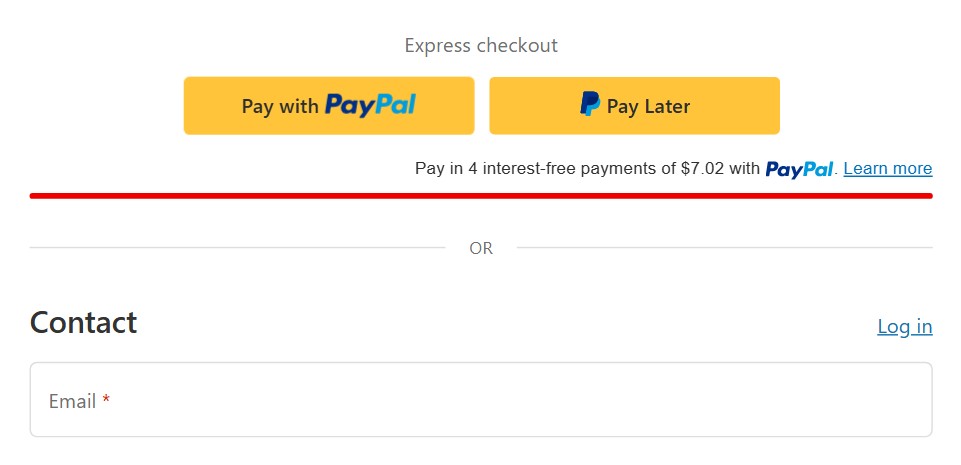
Express checkout section with the PayPal and Pay Later buttons above the contact form of the Modern Checkout page

5The button opens the PayPal window over your store. The customer logs into PayPal, or pays with a debit or credit card.
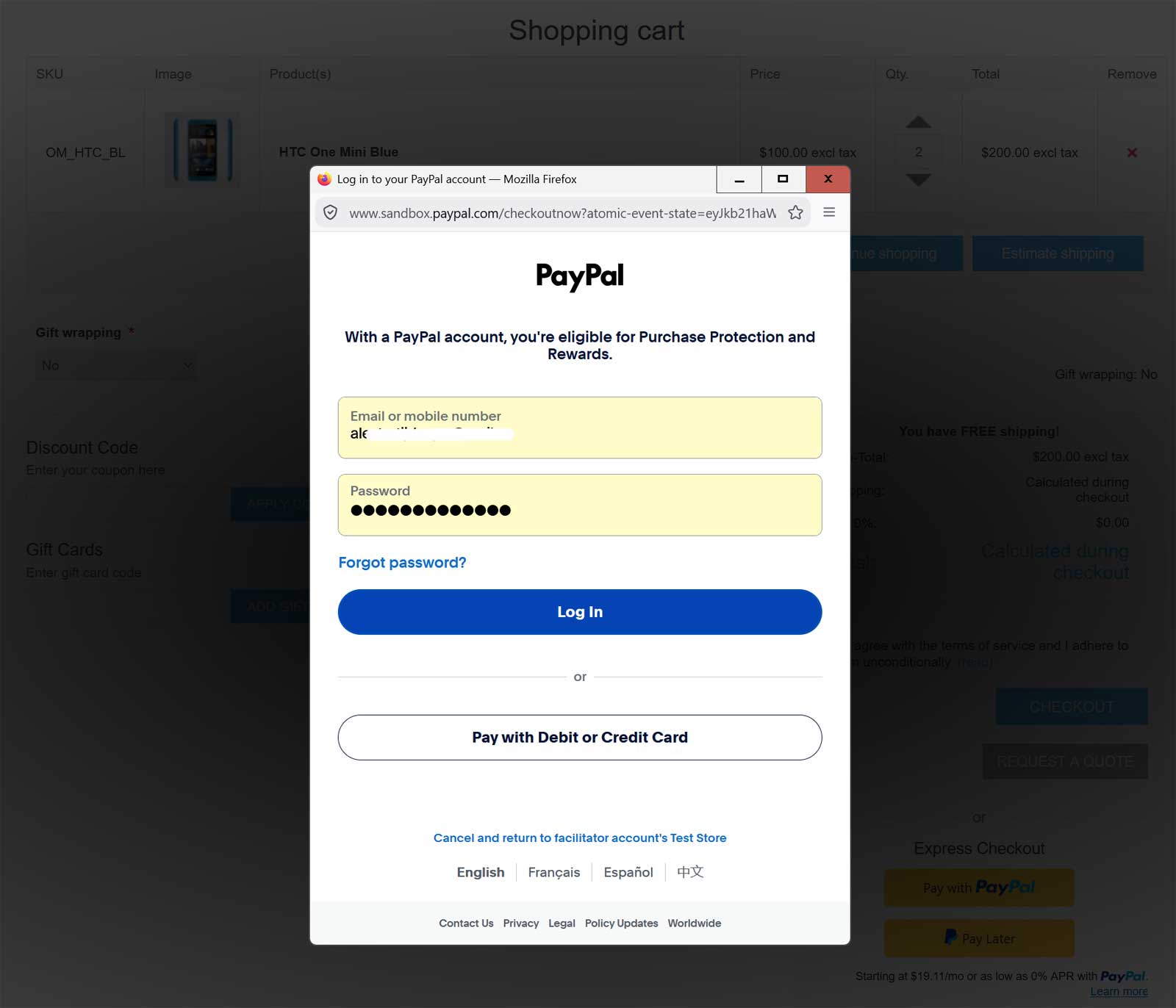
PayPal login window opened over the shopping cart, with Log In and Pay with Debit or Credit Card

6The customer selects the shipping address and the delivery method in the PayPal window, and the total is recalculated. ‘Pay’ places the order at once and the customer sees the order completed page. The name, email, phone and addresses from PayPal are saved to the customer.
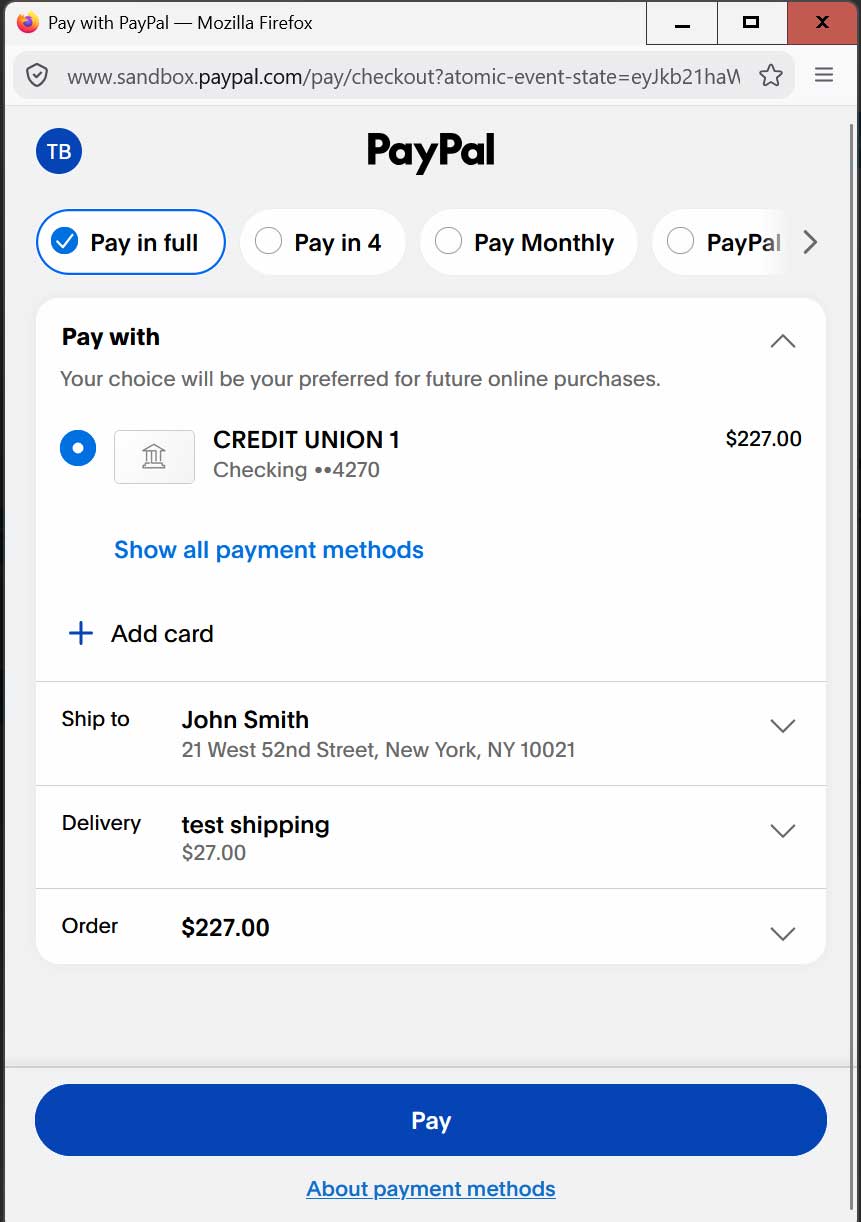
PayPal window with Pay with, Ship to, Delivery, Order total and the Pay button

7The delivery methods in the PayPal window are the shipping methods of your store, with your rates. PayPal shows at most 10 of them.
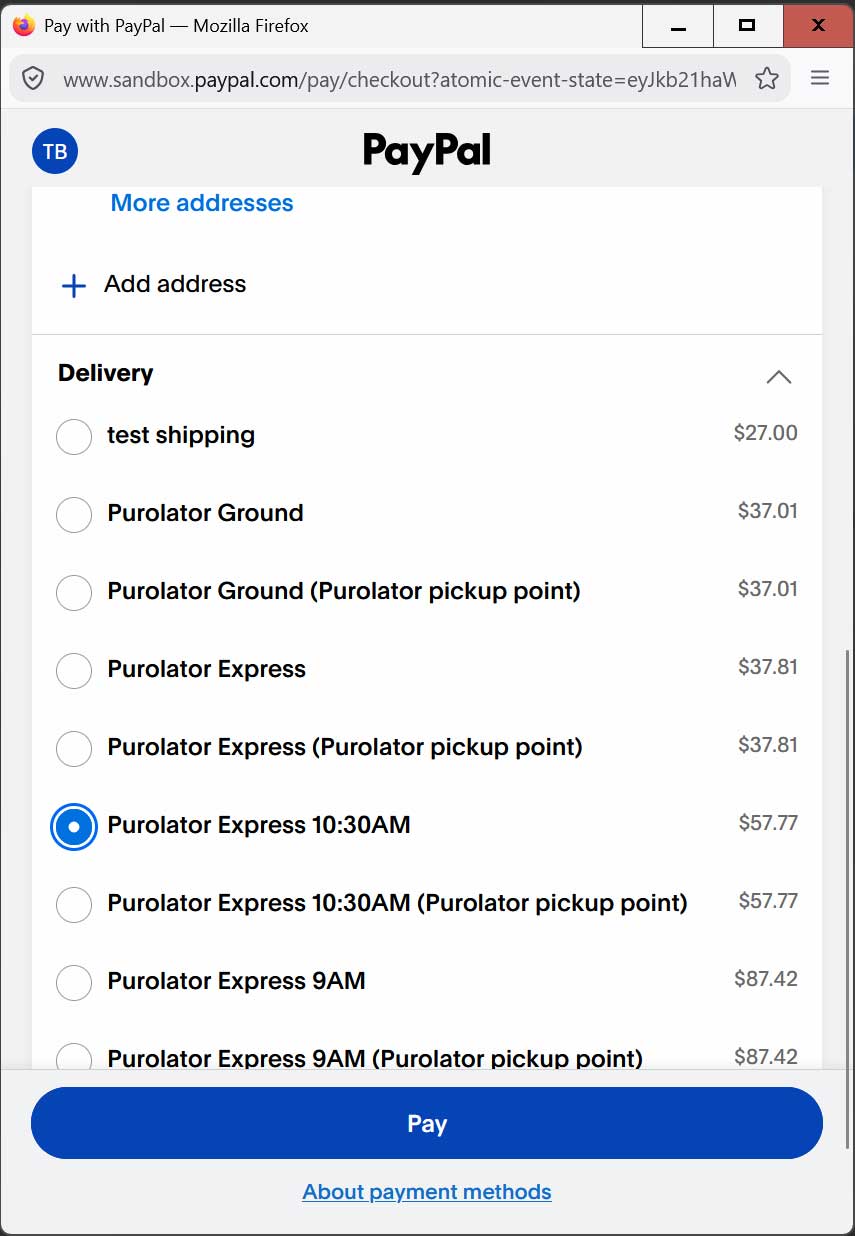
Delivery list in the PayPal window showing the shipping methods of the store with their prices

8‘Enable on Product View’ adds a PayPal button to the product page, with its own color, shape, size and tagline.
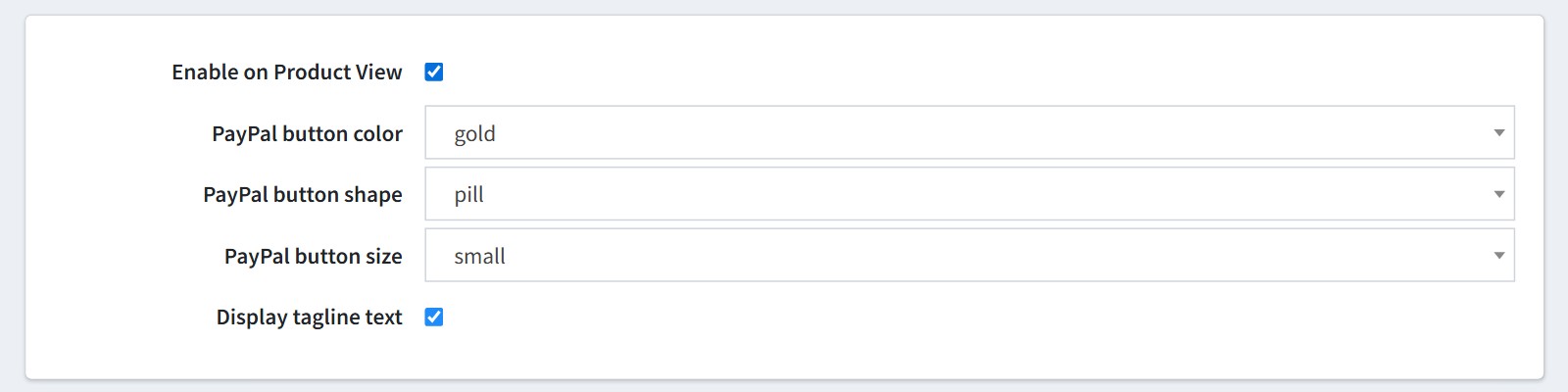
Product page button settings - Enable on Product View, button color, shape, size and tagline

9The button adds the product with the selected attributes to the cart and opens the PayPal window. It is shown for simple products with a price.
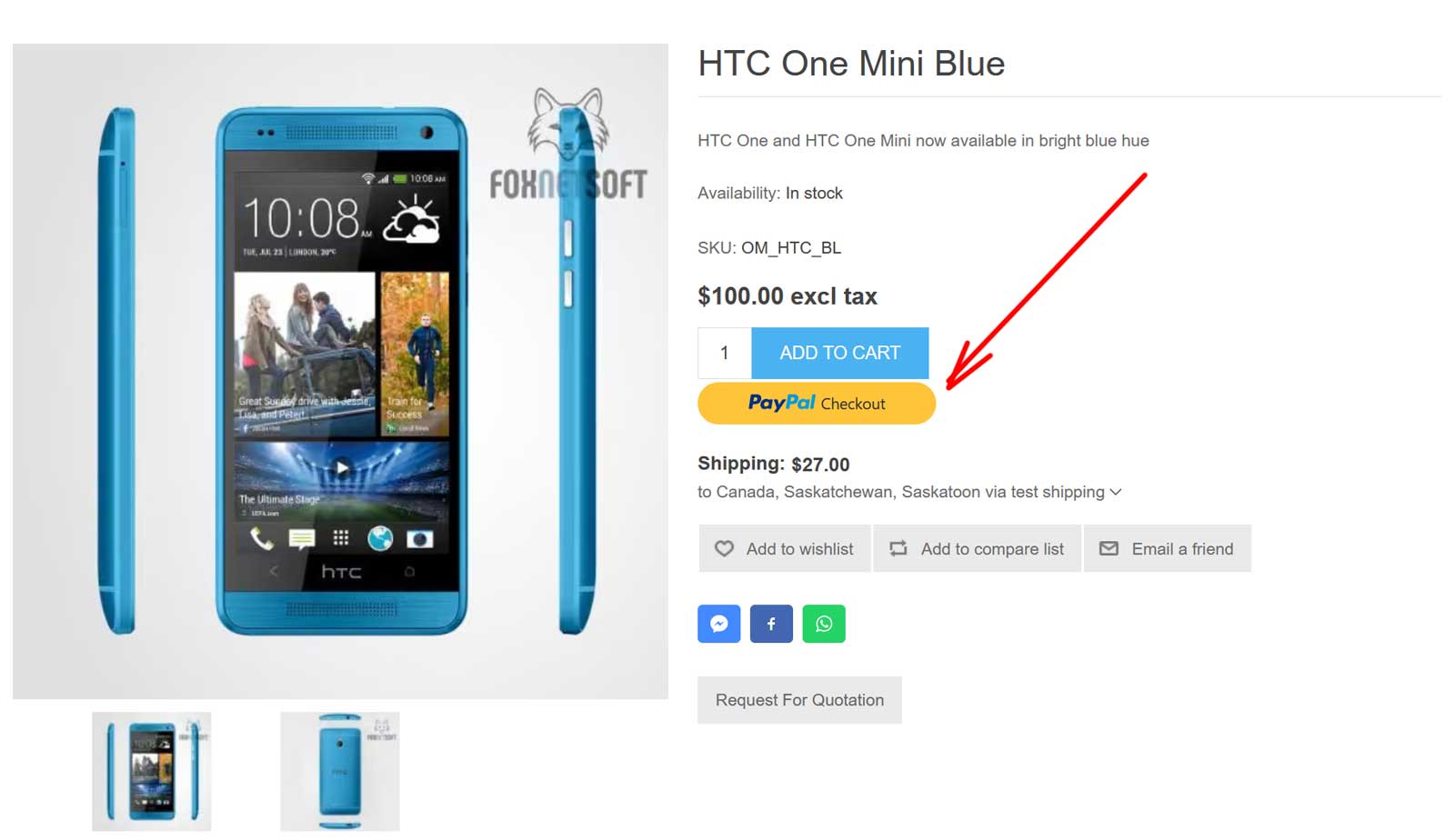
Product page with the PayPal Checkout button under Add to cart

10You could add an additional payment fee, as a fixed amount or as a percentage of the order total.

Additional fee and Additional fee. Use percentage settings

11An authorized payment is captured or voided from the admin order page. The ‘Capture’ and ‘Void’ buttons call PayPal.
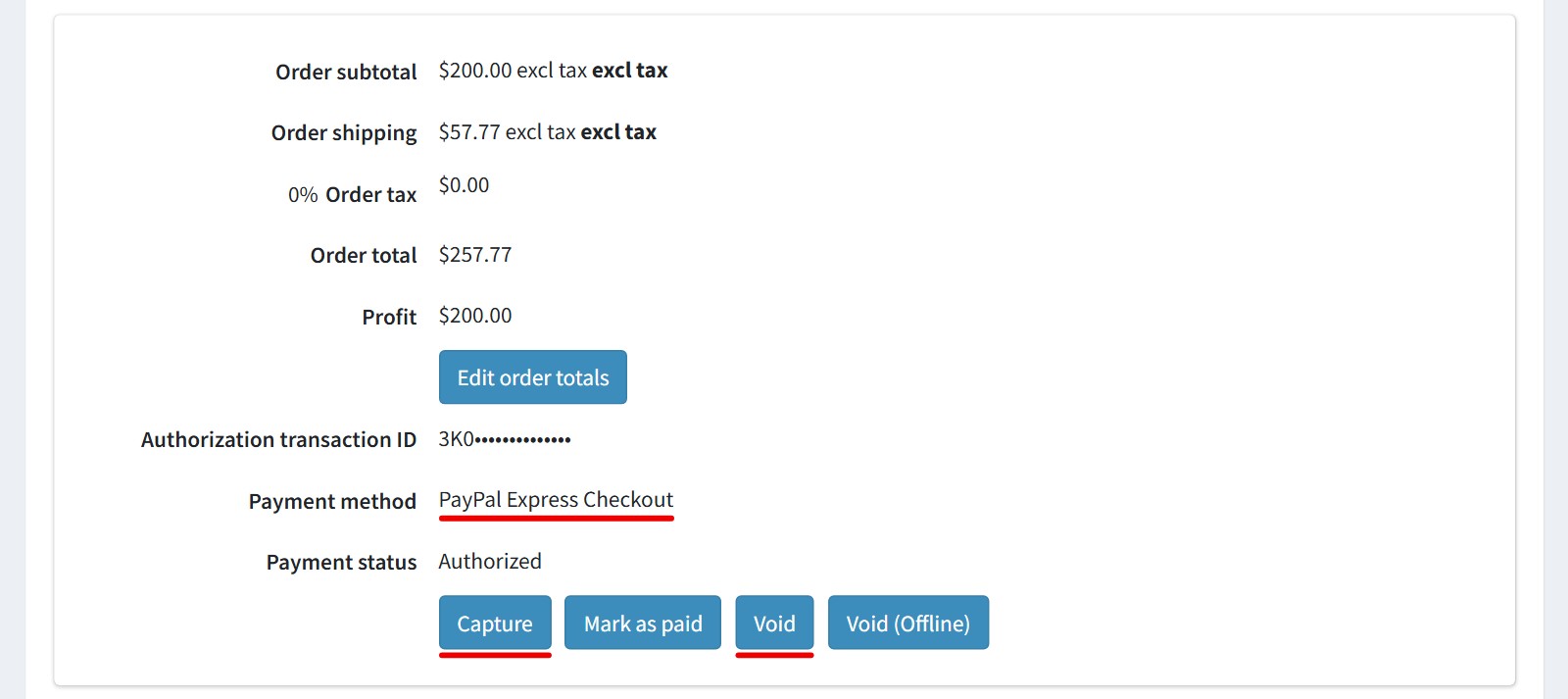
Admin order page of an authorized PayPal Express Checkout payment with the Capture and Void buttons

12After the capture you could refund the payment, in full or in part, from the same page.
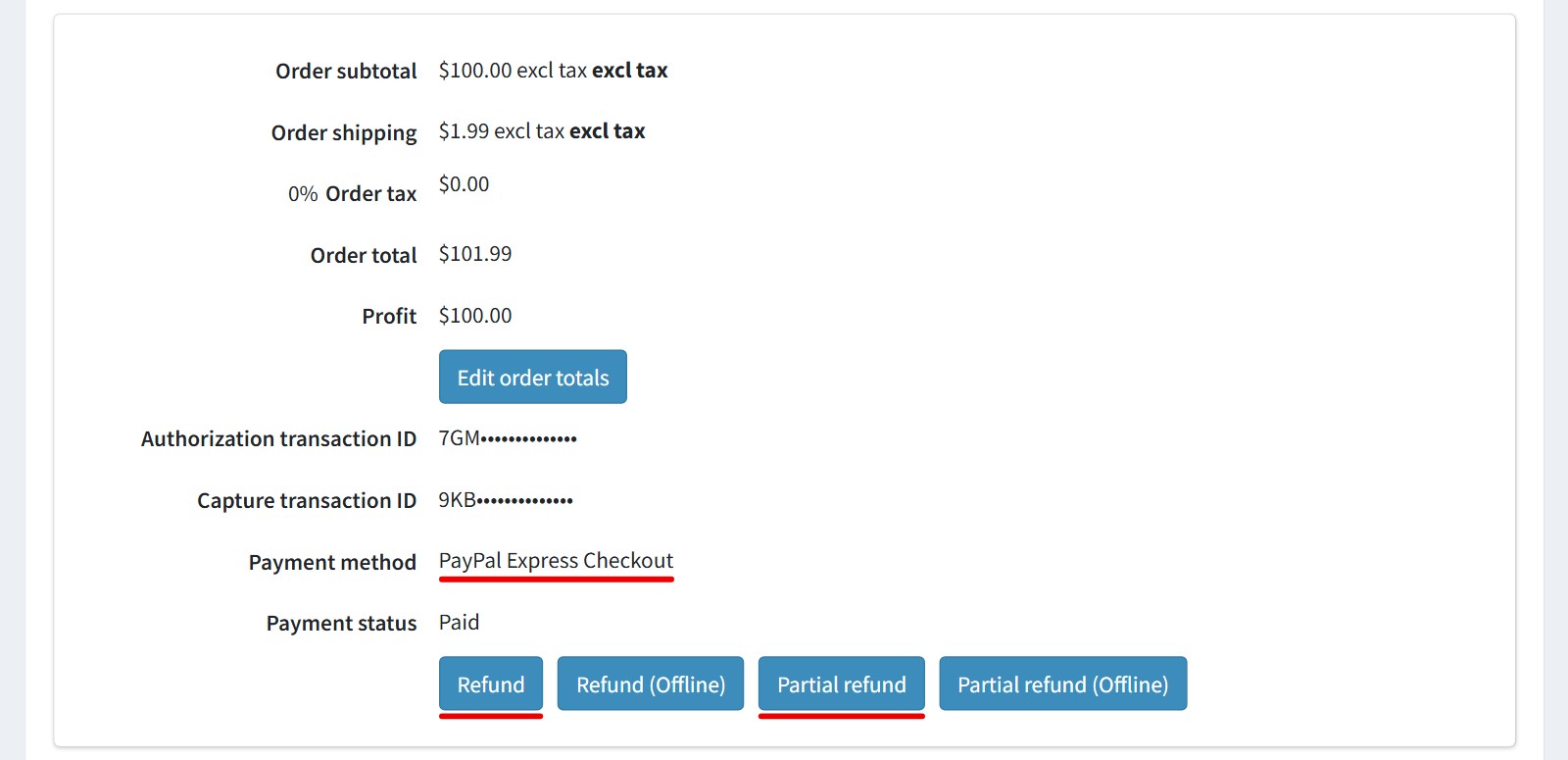
Admin order page of a paid PayPal Express Checkout order with the Refund and Partial refund buttons

13The plugin adds the PayPal transaction, the payer and the order GUID to the order notes.
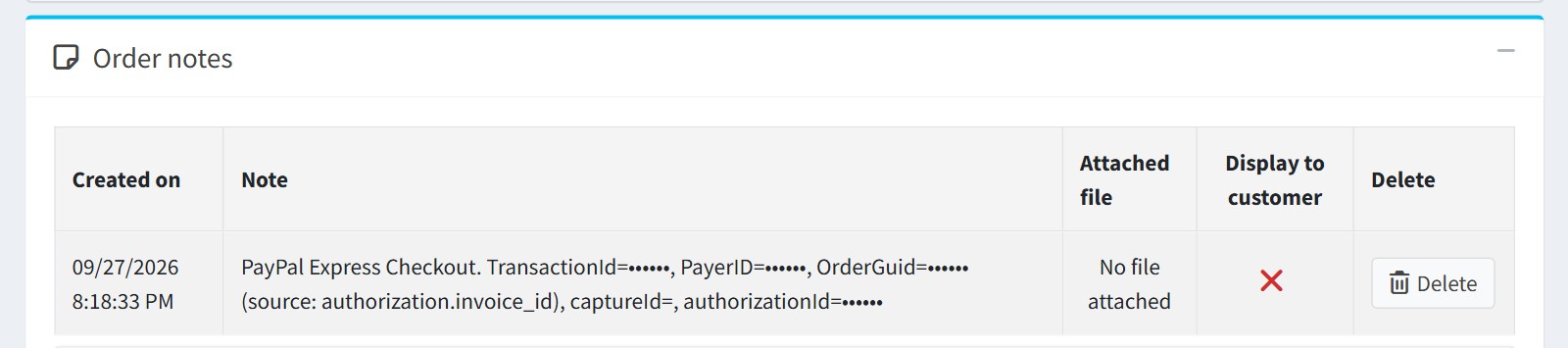
Order notes with the PayPal transaction ID, payer ID, order GUID and authorization ID

Features

  • PayPal, Venmo and Pay Later express buttons on the shopping cart page
  • Optional PayPal button on the product page
  • Address and shipping method selected in the PayPal window
  • The order is placed right after the customer approves the payment
  • Up to 10 store shipping methods, re-rated when the address changes
  • Authorize or capture, with capture, void and full or partial refund from the admin order page
  • PayPal subscriptions for recurring products
  • Webhook order sync with a PayPal signature check
  • Automatic refund if the order can’t be created after the payment
  • Button color, shape, size and tagline for the cart and the product page
  • Store language for the buttons, and the customer’s currency if you enable it
  • Sandbox mode, a fixed or percentage fee, and settings per store

Specification

Supported nopCommerce 5.00, 4.90, 4.80, 4.70, 4.60, 4.50, 4.40

Fully localizable using extermal XML files

Multi-store support

Free Trial (30 days trial period)

1 year free support and upgrades since purchase date

Performance optimization

Easy setup and customization

Fast support

About US

We did more than 190 plugins for nopcommerce. Check out portfolio.

Recensioni
Lab4 09/02/2021 05:36
Used many times, many plugins
We have used this plugin and many others by foxnet, and we have experienced fantastic support, prompt responses and help when we have needed it. The plugins always work and are easier to understand than some competitors. Would highly recommend to others.
Questa recensione è stata utile? Si0 / No0
untiedshoes 09/06/2020 09:11
As a developer, it's always nice to work with another developer with the same work ethic!
My clients use a variety of plugins from foxnetsoft.com, including this one. Over time, we found little bugs, and they've been fixed extremely quickly, or we've requested enhancements.. again, completed very quickly.

All in all, such a great company to work with!!
Questa recensione è stata utile? Si0 / No0
hemilis 22/05/2020 05:27
Great Plugin
This version of the PayPal plugin does capture the customer's phone number (finally!!!). But even better is working with Foxnetsoft. Even though we are literally worlds apart, day and night, I can write this guy almost any time and get a response in less than 30 minutes. That is so fantastic and the info is usually spot on. And even better, if his plugin does not do what you want, for a few $$$ more he will write it for you. We had him write our Affirm plugin and it works perfectly. Many, many kudos....
Questa recensione è stata utile? Si0 / No0
tonyduckett 02/05/2020 03:48
Great Plugin
We were having issues with the standard Nop plugin that was generating duplicate orders on occassion, with the same PayPal token, but one ,arked as pending.  Have moved to this to fix the issue.

Uses different technology to the Nop plugin, and once set up seems to work really well.  Great support from the author as usual.
Questa recensione è stata utile? Si0 / No0
Innovapps 12/03/2020 04:14
Great Plugin
Works great out of the box. We had no hastle installing or configuring it when switching from classical paypal to paypal express.
Questa recensione è stata utile? Si0 / No0
uciocan 29/01/2020 09:38
the best support ever
I bought several plugins from foxnetsoft and the support is fantastic, they helped me a lot with all the configurations. I strongly reccomend FoxNet team
Lorenzo
Questa recensione è stata utile? Si0 / No0
fernando.it 15/01/2020 11:22
Excellent plugin!
I've been using this plugin for months now. It works very well. Also, I've been having great assistance from developers when needed.

Recommended.
Questa recensione è stata utile? Si0 / No0
Match 25/11/2019 12:12
The plug in works and the developer is very responsive
This plugin simplifies the check out process for our customers. Button on the shopping cart page - log in to PayPal - confirm - DONE.

Our unique situation needed a few tweaks, which the developer made very quickly. Good service.
Questa recensione è stata utile? Si0 / No0
[email protected] 02/09/2019 09:11
Excellent plugin
We are using this plugin more than a year ago now. It is working very well. For setting it up we had a very kind, professional support.
Questa recensione è stata utile? Si0 / No0
mikeja85 11/03/2019 11:28
Fantastic Product & Service
A great product. Had some issues with it working at first but fantastic follow up service got the product working for us. Thank you again
Questa recensione è stata utile? Si0 / No0
jamesg 21/11/2018 03:16
One of the best plugin providers
The PayPal Express plugin is essential for fast checkout on mobile devices and works a dream. We had an issue with failed payments for a short while due to an update. The response and fix from Foxnetsoft was fantastic, nothing stopped them fixing it! I would recommend without hesitation.
Questa recensione è stata utile? Si0 / No0
deano 16/11/2018 03:43
Great Plugins!
We have purchased a few plugins from FoxNetSoft and we couldn't be happier, the support is absolutely fantastic, every single issue we have had has been fixed or modified quickly and efficiently, I'd give 6 stars if I could!
Questa recensione è stata utile? Si0 / No0
jonesalexr 15/10/2018 22:22
Helps Speedy Checkout
Instead of the customer having to fill in all the shipping details during checkout, it simply logs them into PayPal and then sends their account info to your store. It is a very speedy way to checkout if your already offering PayPal. Great features and support from the developer.
Questa recensione è stata utile? Si0 / No0
[email protected] 19/06/2018 03:12
Great support
Professional support and customer care. Well done. Great the plugin works great. Thank you!
Questa recensione è stata utile? Si0 / No0
kire 08/06/2018 07:04
Excellent plugin and outstanding support!
This plugin is excellent, it does everything you need for a store.

The Support from foxnetsoft is outstanding with all their products! They respond immediately and are always there to help/support with any query or fix stuff quickly.

The author also takes care of all his products and updates them constantly with new features and fixes, and there is great documentation for all of them
Questa recensione è stata utile? Si0 / No0